Yojam

Every link, exactly
where it belongs.

Yojam lives invisibly in your menu bar, intercepting clicks and routing them to the right browser, profile, or app.

or install with Homebrew
brew install --cask yojam
Requires macOS 14.0+ • Free & Open Source

I got tired of clicking a Figma link in Slack and watching Safari struggle to open it, only to remember I was supposed to be logged into my work profile in Chrome.

I built Yojam because OS default browsers are a blunt instrument. We have personal browsers, work profiles, private windows, and dedicated web apps. Links shouldn't just open; they should be routed intelligently based on context.

Yojam sits silently. It doesn't have a dock icon. It just catches the URL, checks your rules, strips the tracking garbage, and hands it off.

A utility knife for URLs.

Everything you need to control link routing, nothing you don't.

Intelligent Rules Engine

Map domains, exact paths, or Regex patterns to specific browsers. `figma.com` goes to the desktop app. `jira.*` goes to Chrome Work profile. Create complex logic that adapts to your daily workflow automatically.

Profiles & Firefox Containers

Full support for Chrome, Edge, Brave, Arc, and Firefox profiles. Per-rule targeting into Firefox Multi-Account Containers, too. Don't just open the browser, open the right identity.

Privacy First

Automatically strips 30+ known tracking parameters (`utm_source`, `fbclid`, `gclid`) before the browser ever sees the URL.

URL Rewriting

Transform links on the fly. Change `twitter.com` to `nitter.net`, or force specific YouTube links to open in a third-party client.

Private Windows

Set rules to always open specific domains directly in a new Incognito or Private window.

Clipboard Monitor

Optionally watch your clipboard. Copy a link, and tap a shortcut to instantly open it via the picker without clicking.

Auto-learning

If you manually pick Safari for `apple.com` three times, Yojam will suggest creating a permanent rule for it.

iCloud Sync

Routing rules, custom browsers, and per-app settings stay in step across every Mac you sign in to. No third-party server in the loop - just your own private iCloud.

Not just browsers.

Half the links you click don't really want a browser. Send `zoom.us` straight to the Zoom app, `figma.com/file/*` to the Figma desktop client, and a `mailto:` to whichever mail app fits the recipient. Anything that registers a URL scheme - Slack, Notion, Linear, Tower, Things, OmniFocus - is fair game.

Shortcuts Integration

Native Apple Shortcuts actions for opening URLs through the rules engine. Glue it into a Stream Deck button, an AppleScript, or any workflow that ends with "and then open this in Chrome Work."

Zero telemetry. Truly.

Yojam is a dumb pipe with smart rules, and every rule runs on your machine. No analytics, no crash reporters, no opt-in "help us improve" toggle hidden in a submenu. We don't want your browsing history - we wouldn't know what to do with it.

The Pipeline

What happens in the milliseconds after you click a link.

1

Intercept

You click a link in Slack, Mail, or Terminal. macOS hands the URL to Yojam, the default system browser.

2

Cleanse

The URL is parsed. Known tracking parameters and analytics tags are aggressively stripped from the query string.

3

Evaluate

The clean URL is checked against your rules engine. It matches domain logic, path regex, and app protocols.

4

Execute

If a rule matches, the URL is silently handed to the target app/profile. If no rule matches, the Picker UI appears.

The Picker.

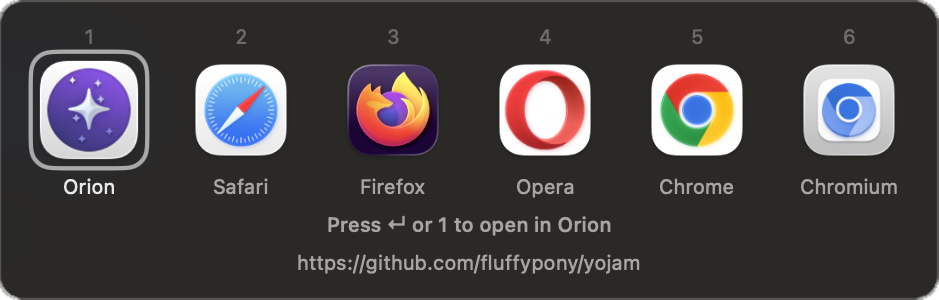
When a link doesn't match an automatic rule, Yojam summons a floating, keyboard-first UI right where your mouse is.

  • 1-9 Jump to a browser by position
  • Enter / Space Open in the highlighted browser
  • Cmd + C Copy URL to clipboard
The Yojam picker UI

Questions & Answers

Is it really free?

Yes. Completely free and open-source under the BSD 3-Clause license. If you find it useful, you can sponsor the project on GitHub, but there are no paywalls or premium features.

What browsers are supported?

Any browser installed on your Mac. It auto-detects Safari, Chrome, Edge, Firefox, Arc, Brave, Orion, and SigmaOS. It also supports custom Chromium and Firefox profiles.

Can I disable the tracker stripping?

Yes, you can toggle "Clean URLs" globally, or disable it per-rule. Sometimes marketing teams actually need those UTM tags, so you have full control.

Does it handle mailto: links?

Yes. Yojam registers as a mail handler as well as a browser, so the same rules engine works on mailto: links. Route by recipient domain - anything ending in @work.com opens in Outlook, everything else falls through to Apple Mail.

Where are my settings stored?

Locally, in ~/Library/Application Support/Yojam/rules.json. It's plain JSON - edit it by hand if you want. Turn on iCloud Sync and the same file rides along in your private iCloud, which nobody else can read, including us.